Tycho API and Python Package
Every Tycho calculator is also an Application Programming Interface (API). The page in the browser and the data a script reads come from the same address. This page describes that address and its answers, for a spreadsheet or a batch of observations. And it describes wndsn-tycho, a small Python package that builds the address and reads the answer.
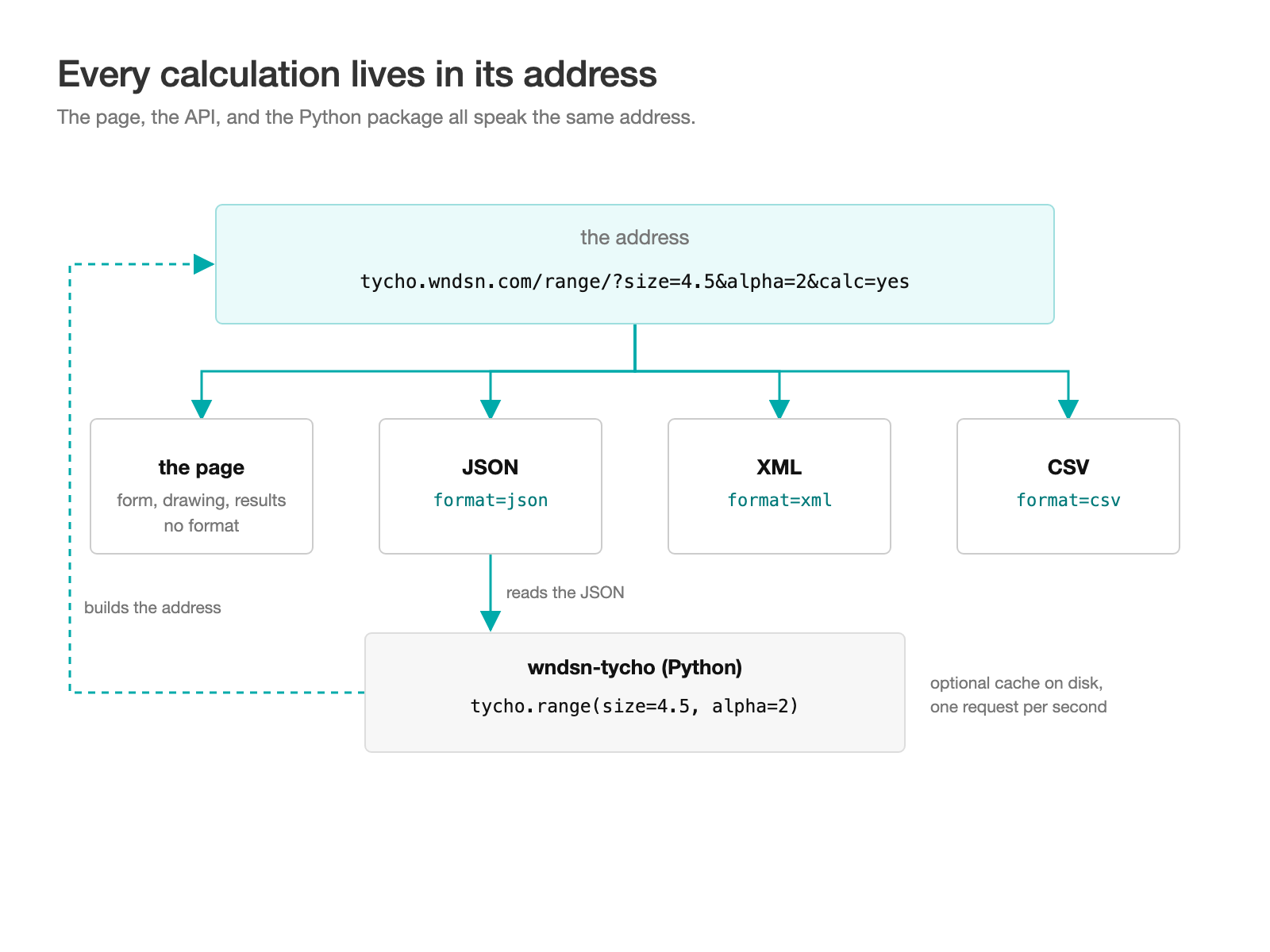
The page and the API share one address, and the Python package builds it.
One address, four replies
The calculators are RESTful: every calculation lives in its address. The values entered go into the link with their units and the page's settings, so a bookmark or a shared link brings back the same result. Add format=json to that link, and the calculator answers with data instead of a page. format=xml and format=csv work the same way.
GET https://tycho.wndsn.com/<calculator>/?<parameters>&calc=yes&format=json|xml|csv
<calculator> is the path of the calculator's page, such as range or sun. Don't forget calc=yes to calculate. Without it, the address returns the page with its sample values, whatever the format.
Request to the Range calculator for the distance to an object of 4.5 m seen at 2°:
https://tycho.wndsn.com/range/?size=4.5&alpha=2&angular_unit=deg&unit=m&calc=yes&digits=1&format=json
JSON answer:
{"input":{"alpha":2,"angular_unit":"deg","size":4.5,"unit":"m"},
 "output":{"distance":128.9,"multiplier":28.6,"degrees":2,"mil":34.9,"natomil":35.6,"moa":120},
 "digits":1}
The same query with format=xml:
<range>
 <input><alpha>2</alpha><angular_unit>deg</angular_unit><size>4.5</size><unit>m</unit></input>
 <output>
  <distance>128.9</distance><multiplier>28.6</multiplier>
  <degrees>2</degrees><mil>34.9</mil><natomil>35.6</natomil><moa>120</moa>
 </output>
 <digits>1</digits>
</range>
Answer structure
JSON and XML carry the same structure:
input- What was given, under the parameter names and with its units.
output- What was calculated. The Sun and the Moon have many results, so their
outputis grouped: the Sun's clock times sit underlongitudinal, for example. notes- Follows when there are any.
digits- Closes the answer.
Numbers come back as numbers. A value that does not exist, such as sunrise during the polar day, is null in JSON and empty in XML and CSV.
As it has been, digits sets the decimals of the results, from 0 to 9. Inputs come back as given. To calculate further with the results, ask for more digits than will be printed, so the values are rounded only once.
CSV for spreadsheets
A CSV answer is one header line and one row. Every query to a calculator has the same columns, so the rows of many queries stack into one table. The input column names the values given, such as alpha+size, so a mixed batch stays readable. Range at four angles, digits=1:
input,alpha,angular_unit,multiplier,size,distance,unit,degrees,mil,natomil,moa,notes,digits
alpha+size,0.5,deg,114.6,4.5,515.6,m,0.5,8.7,8.9,30,,1
alpha+size,1,deg,57.3,4.5,257.8,m,1,17.5,17.8,60,,1
alpha+size,2,deg,28.6,4.5,128.9,m,2,34.9,35.6,120,,1
alpha+size,4,deg,14.3,4.5,64.4,m,4,69.8,71.1,240,,1
Notes
Invalid input answers with notes in plain English, so a script can read what went wrong. The note names the problem, but the rest is still answered: values that do not depend on the bad input come back. Range with a size of four:
https://tycho.wndsn.com/range/?size=four&alpha=2&angular_unit=deg&unit=m&calc=yes&digits=1&format=json
{"input":{"alpha":2,"angular_unit":"deg","unit":"m"},
 "output":{"multiplier":28.6,"degrees":2,"mil":34.9,"natomil":35.6,"moa":120},
 "notes":["The size must be a number greater than 0 and up to 65536."],
 "digits":1}
The angle's conversions are there, next to a note that the size must be a number.
Where to start
Each calculator lists its parameters and their limits under "URL and API parameters" in its Explanation section. But the easiest way in is the page itself. Calculate something, then look at the Results heading: it links the JSON, XML, and CSV answer for whatever is on screen. Copy one of those links, and you have a working query to change.
House rules
- No key or account is needed.
- Send no more than one request per second. An address that gives every value gives the same answer every time, so keep the answers rather than asking again.
- The answers may only be read by pages on tycho.wndsn.com (
Access-Control-Allow-Origin: https://tycho.wndsn.com). A script on another website therefore cannot fetch them in its visitor's browser. Call the API from a server or the command line instead. - Parameter names we have replaced still work, such as
known_sizeforsize. Old links and old scripts keep working.
wndsn-tycho for Python
If you work with Python, wndsn-tycho saves you the address building. It has one typed method per calculator, with named arguments that are checked before anything is sent. It returns results as frozen dataclasses with named fields. It needs Python 3.9 or later and nothing outside the standard library. It is MIT licensed.
pip install git+https://github.com/gqt0/wndsn-tycho@v0.1.0
from wndsn_tycho import Tycho

tycho = Tycho()
tycho.range(size=4.5, alpha=2).distance       # 128.86314
tycho.dip(4, h2=49).distance_km               # 34.66944
The second call is the lighthouse from the Baltic trip on the Wndsn blog: an eye height of 4 m and a light at 49 m give 34.7 km, the distance on the map in that post. The package asks Tycho for 6 digits by default.
The package keeps to the house rules on its own. It waits at least a second between calls to tycho.wndsn.com and names itself in its requests (User-Agent: wndsn-tycho/0.1.0 (Python)). When the server is busy, it waits and tries again.
A size over Tycho's limit of 65536, or a latitude of 95°, is refused before a request goes out:
tycho.range(size=70000, alpha=2)
# ValueError: size must be at most 65536, got 70000
Input that only Tycho can judge raises TychoInputError, an error that carries Tycho's notes in .notes.
A batch is a plain loop:
for alpha in (0.5, 1, 2, 4):
    print(alpha, tycho.range(size=4.5, alpha=alpha).distance)
0.5 515.648926
1 257.804827
2 128.86314
4 64.352998
For repeated runs there is an optional cache on disk. Tycho(cache=True) keeps every answer, so asking again costs no call at all. And a cache folder of your own, such as Tycho(cache="tests/tycho-cache") kept next to your tests, lets those tests run without a network.
The command line:
wndsn-tycho range size=4.5 alpha=2 --format csv --digits 1
input,alpha,angular_unit,multiplier,size,distance,unit,degrees,mil,natomil,moa,notes,digits
alpha+size,2,deg,28.6,4.5,128.9,m,2,34.9,35.6,120,,1
The package is at version 0.1.0. Its README lists every calculator and its fields, and its docs describe the API in more detail than this page. If something does not work the way you expect, please let us know.